 |
||||||||
|
||||||||
|
The content presented here requires JavaScript to be enabled and the latest version of the Macromedia Flash Player. If you are you using a browser with JavaScript disabled please enable it now. Otherwise, please update your version of the free Flash Player by downloading here. |
||||||||
|
Setting Up Internet
TV
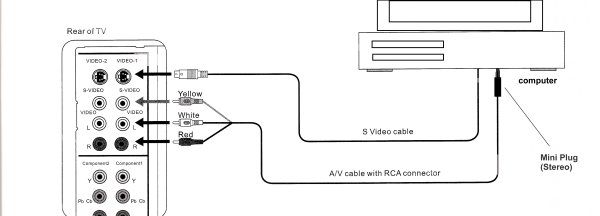
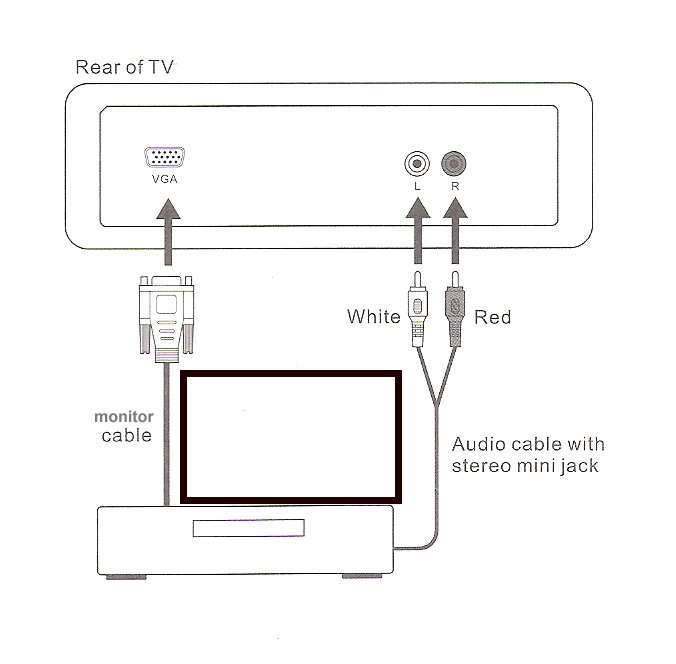
You can set up your television to watch TV being sent to you overn the Internet. First, you'll need to have a high speed or broadband connection. If you are using dial-up still, There are enough compelling reasons to make the move now. Of course, you can still watch television on your computer. It's even better to watch it on a larger screen TV. Fantasy-TV.com has been lab tested on 27 inch and 32 inch LCD televisions with phenomenal results. HOOKING UP You'll need to connect your computer to the video and audio of your television separately. This will also allow you to accomodate using your home theater sound for the high quality digital audio.
Your computer should have an S-video output from the video card. Also, if you want to watch better resolution, using the digital out put from your computer video is even better. If you have an LCD television with a VGA Monitor input, or an HDMI or DVI input you can plug your computer video directly into the TV from the video card and the audio from the computer sound.
Things that will help you.: Get a wireless mouse and keyboard. Some wireless mice (air mice) act as pointers to the screen. You can adapt to using this like you would a remote control. An alternative to this is getting your computer closer to where you intend to watch TV and use a monitor extension cable to connect your system. Enjoy your new Fantasy-TV television experience.
|
||||||||

|








| © Copyright 2005-2008 Avortex Entertainment - all rights reserved DISCLAIMER |
 |